SaaSFrame
Part of First Steps in the Playground
Cartesia Dashboard
 CartesiaReal-time voice AI models for developers
About this screen
Four shortcuts under the welcome
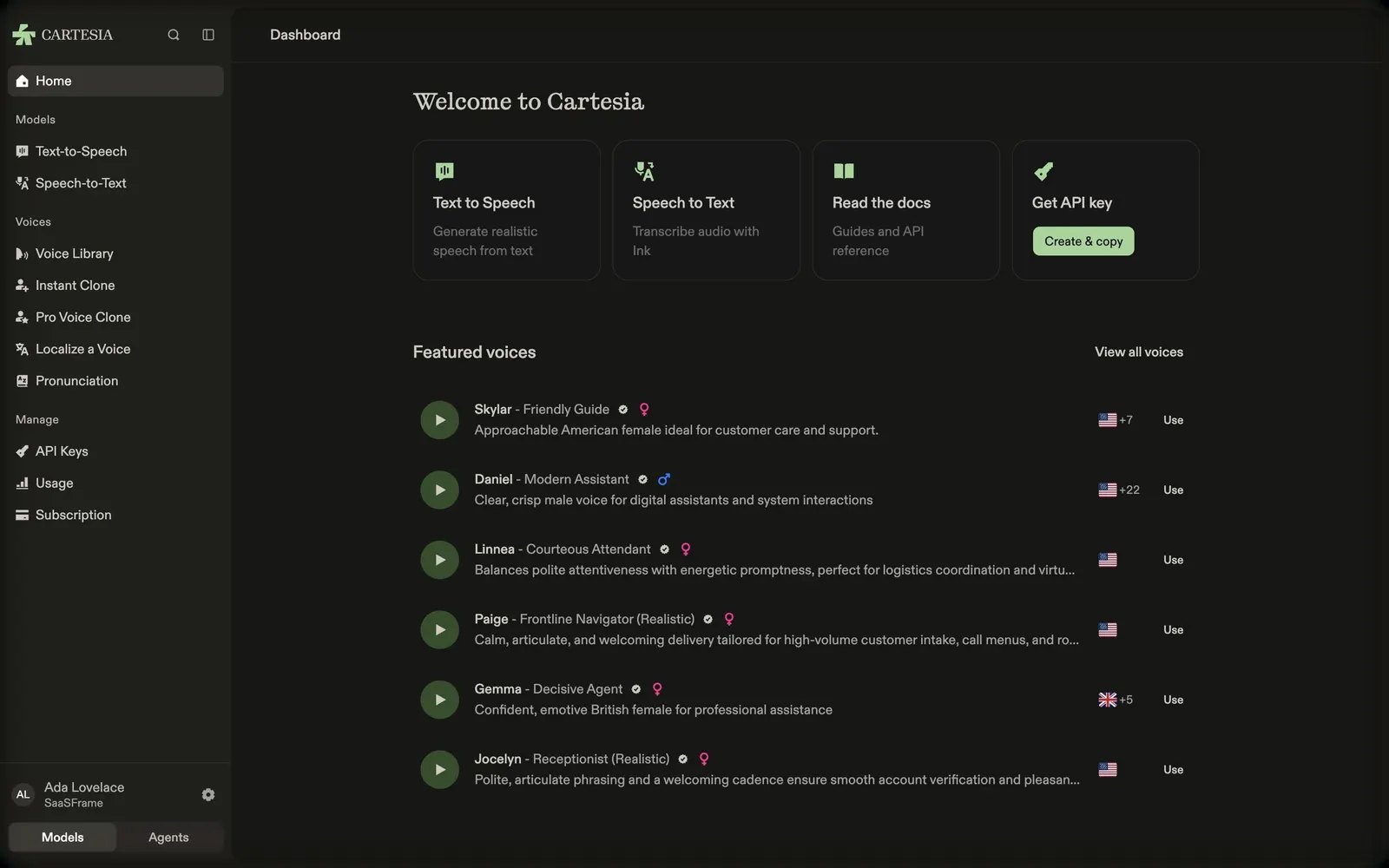
Cartesia's playground home greets with "Welcome to Cartesia" and four cards: Text to Speech, Speech to Text, Read the docs, and Get API key with a green "Create & copy" button.
Voices to try immediately
"Featured voices" lists voices as rows with a round green play button, a name and persona (Skylar – Friendly Guide, Daniel – Modern Assistant, Linnea – Courteous Attendant…), a verified badge, a gender icon, a one-line description, language flags with a count and a "Use" action, with "View all voices" at the top right.
Two products in one sidebar
The sidebar groups Models (text-to-speech, speech-to-text), Voices (library, instant clone, pro voice clone, localize, pronunciation) and Manage (API keys, usage, subscription), and a Models / Agents switch at the bottom changes the whole navigation.