SaaSFrame
Neon Documentation
 NeonServerless Postgres for apps and agents
About this page
Docs that start with an agent prompt
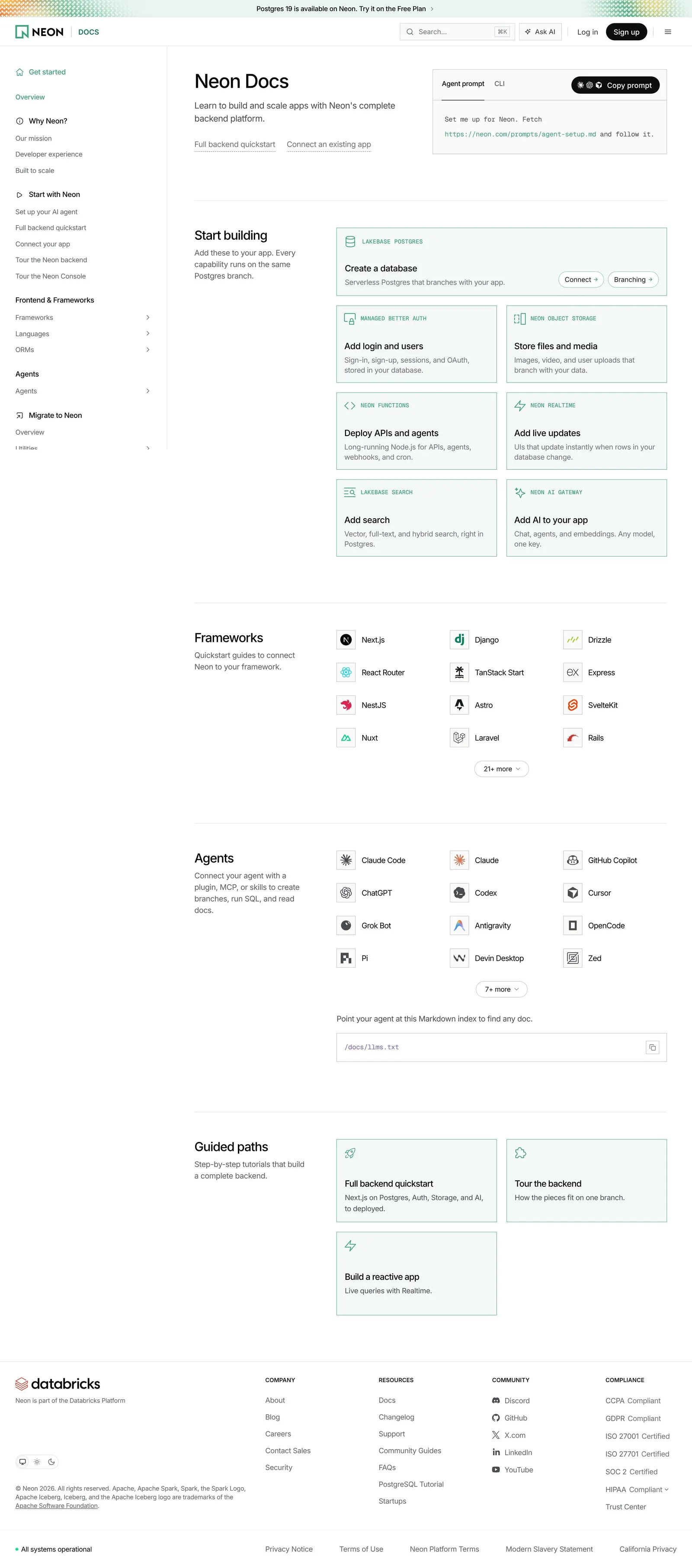
Neon's documentation home switches to a light theme with a "Docs" label beside the logo. "Neon Docs" and "Learn to build and scale apps with Neon's complete backend platform." sit next to a box with "Agent prompt" and "CLI" tabs, a one-line setup instruction and a black "Copy prompt" button, with two dotted links for the full backend quickstart and connecting an existing app.
Products as green cards
"Start building" lays out pale green cards with a mono product overline and a task title: Create a database (with Connect and Branching chips), Add login and users, Store files and media, Deploy APIs and agents, Add live updates, Add search and Add AI to your app.
Frameworks, agents and guided paths
Icon grids list framework quickstarts (Next.js, Django, Drizzle…) and coding agents (Claude Code, Codex, Cursor…), each with a "more" pill, then a copyable "/docs/llms.txt" index and three "Guided paths" cards. A left sidebar organizes Get started, Why Neon?, Start with Neon, Frontend & Frameworks, Agents and Migrate to Neon.