SaaSFrame
Part of Create a Workflow
Langdock Workflows Overview
 LangdockCompany-wide AI chat, agents and workflows
About this screen
Monitoring before content
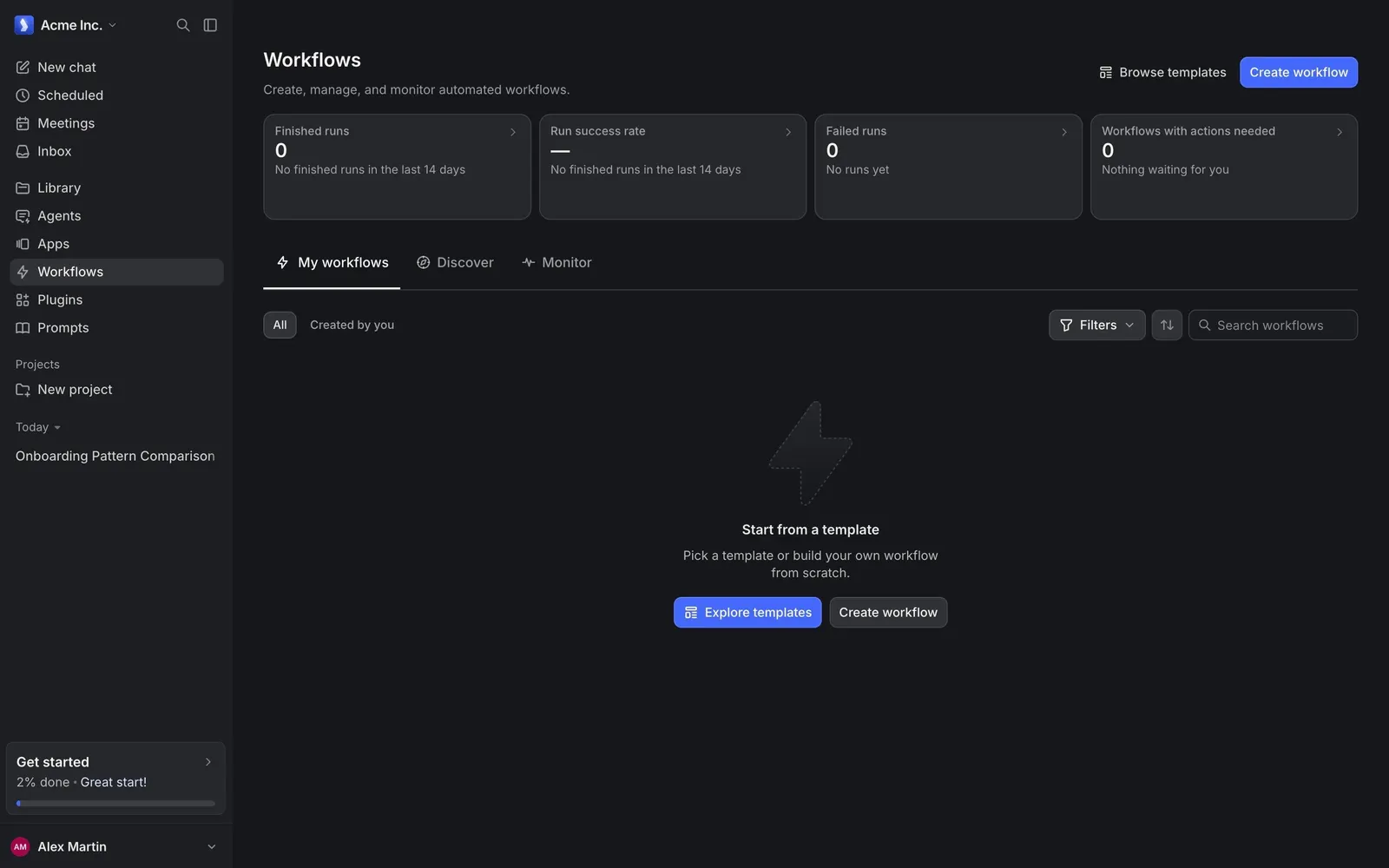
Langdock's Workflows page opens with four stat cards even before any workflow exists: "Finished runs", "Run success rate", "Failed runs" and "Workflows with actions needed", each showing 0 or a dash with a short explanation such as "No finished runs in the last 14 days".
Three tabs and a filter row
Below, tabs switch between "My workflows", "Discover" and "Monitor". An "All / Created by you" toggle, a "Filters" button, a sort button and a search field sit above the list area.
An empty state that points to templates
The empty list shows a large faded lightning icon, "Start from a template" and "Pick a template or build your own workflow from scratch.", with a blue "Explore templates" button next to a plain "Create workflow". The header repeats "Browse templates" and "Create workflow" in the top right.