SaaSFrame
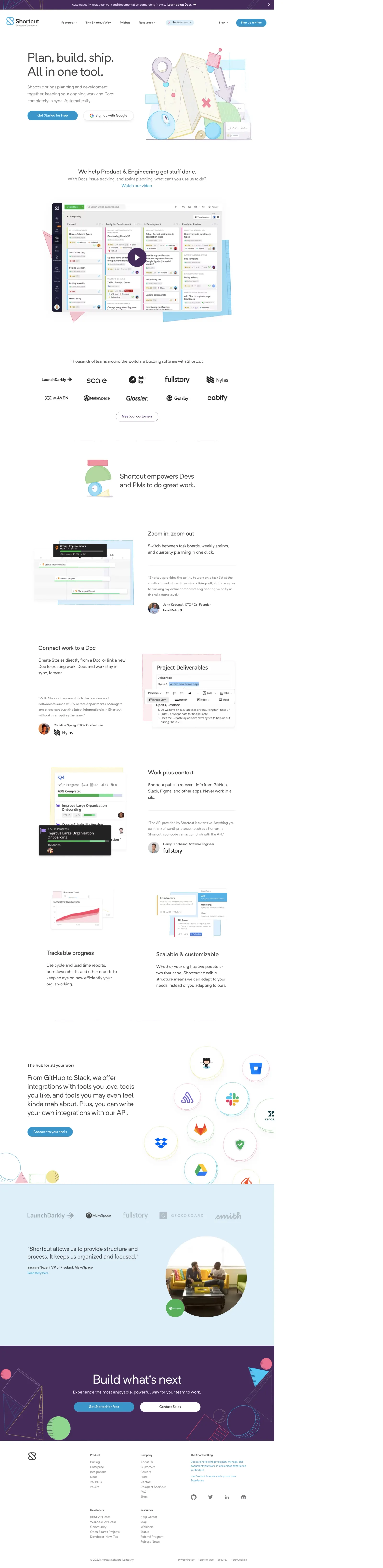
1. Header: The website has a header that consists of the Clubhouse logo on the left followed by a hamburger icon that contains all the menu items. On the right side, there are options to sign up and log in. 2. Hero Section: The homepage has a hero section that contains an illustration of people working, followed by a heading that describes the Clubhouse product as "The project management tool that engineers love." 3. Features Section: The next section highlights the features of Clubhouse with an illustration followed by the feature headings and descriptions. The features include Roadmaps, Epics & Milestones, Kanban Boards, Workflows, and Integrations. 4. Testimonials Section: This section contains customer testimonials with their names, positions, and company logos. The testimonials showcase Clubhouse's effectiveness in improving the productivity of software development teams. 5. Pricing Section: The pricing section displays the pricing plans offered by Clubhouse with detailed descriptions of each plan. 6. Comparison Chart: The website also has a chart that compares Clubhouse with other project management tools in the market. The chart compares the pricing, features, and benefits to provide users with a comprehensive understanding of Clubhouse's advantages over its competitors. 7. Demo Request Section: The website also provides an option to request a demo, which redirects the user to another page where they can choose the preferred date and time of the demo. 8. Integrations Section: The website lists the integrations supported by Clubhouse, such as GitHub, Slack, Zapier, and many others, to showcase the product's flexibility and compatibility with other tools. 9. Footer: The footer contains links to the company's social media pages, support pages, and other important pages such as the company blog and terms of service. The footer also displays copyright information and quick links to contact the company.